Storage
@openzeppelin/ui-storage provides client-side persistence for UIKit applications. It is built on Dexie.js (an IndexedDB wrapper) and ships a plugin system for extending storage with domain-specific functionality.
Installation
pnpm add @openzeppelin/ui-storageWhy Use the Storage Plugin?
Browser applications commonly reach for localStorage to persist user data. While fine for a handful of string values, localStorage hits hard limits as your app grows:
| Concern | localStorage | @openzeppelin/ui-storage (IndexedDB) |
|---|---|---|
| Storage quota | ~5 MB per origin | Hundreds of MB, often limited only by available disk space |
| Data model | Flat key-value strings; every read/write requires JSON.parse/JSON.stringify | Structured object stores with typed records, indexes, and compound queries |
| Performance | Synchronous: blocks the main thread on every call | Asynchronous: all reads and writes are non-blocking |
| Querying | Full-scan only; no way to filter or sort without loading everything | Indexed lookups and range queries via Dexie.js |
| Concurrent tabs | No built-in synchronization; race conditions on simultaneous writes | Transactional; supports multi-tab coordination out of the box |
| Schema evolution | Manual: you must handle migrations yourself | Declarative versioned schemas with automatic upgrade migrations |
Beyond these raw IndexedDB advantages, the storage plugin adds an opinionated layer designed for blockchain UIs:
- Typed base classes:
EntityStorage<T>andKeyValueStoragegive you CRUD, validation, quota handling, and timestamps without boilerplate. - Plugin system: domain-specific plugins (like the built-in account alias plugin) drop into any Dexie database and integrate with UIKit providers automatically.
- Reactive hooks:
useLiveQueryre-renders components when the underlying IndexedDB data changes, including changes from other browser tabs. - Quota-safe writes: the
withQuotaHandlingwrapper catchesQuotaExceededErrorand surfaces a typed error code so your UI can handle it gracefully instead of silently failing.
When Does It Make Sense?
Use @openzeppelin/ui-storage when your application needs to persist structured, queryable data on the client, especially data that grows over time or must survive page reloads. Common examples include:
-
Contract history and recent contracts: the Role Manager persists recently accessed contracts per network in a
RecentContractsStoragebuilt onEntityStorage. Records are indexed by[networkId+address]for fast lookups and sorted bylastAccessedso the most recent entries always appear first. The same result inlocalStoragewould require deserializing, sorting, and re-serializing an entire array. -
UI configuration and form state: the UI Builder stores complete contract UI configurations (including large ABIs and compiled contract definitions) in a
ContractUIStorageentity store. With records that can reach tens of megabytes,localStorage's 5 MB limit would be a non-starter. The storage plugin also powers the builder's import/export and multi-tab auto-save features. -
User preferences and settings: both projects use
KeyValueStoragefor simple typed preferences (theme, active network, page size), a lightweight alternative that still benefits from async I/O and schema versioning. -
Address book and aliases: the built-in account alias plugin persists address-to-name mappings in IndexedDB and wires them into UIKit's
AddressLabelProviderandAddressSuggestionProvider. EveryAddressDisplayandAddressFieldin the component tree resolves labels automatically without any per-component wiring.
If your app only stores a single flag or token, localStorage is perfectly adequate. Reach for the storage plugin when you need indexed queries, large payloads, multi-tab safety, or domain-specific persistence that integrates with the rest of the UIKit ecosystem.
Core Abstractions
The package exposes two base classes that your application can extend:
| Class | Description |
|---|---|
EntityStorage<T> | Generic IndexedDB store for typed entities. Handles create, read, update, delete, and query. |
KeyValueStorage | Simple key-value store backed by IndexedDB. Useful for persisting settings and preferences. |
Both classes wrap a Dexie database instance and can be composed with plugins.
Account Alias Plugin
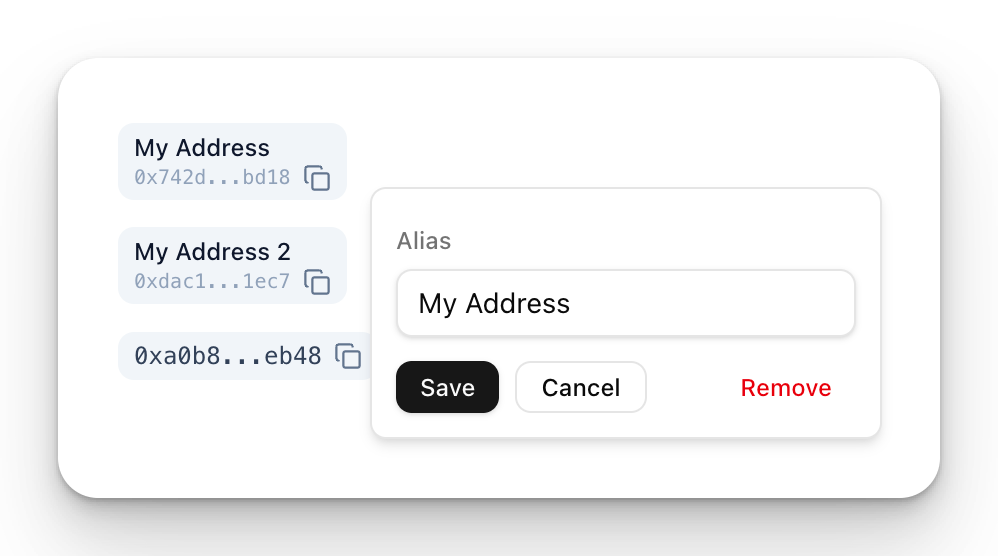
The built-in account alias plugin persists address-to-name mappings. It powers the AddressBookWidget and integrates with AddressLabelProvider and AddressSuggestionProvider to resolve human-readable labels automatically across all AddressDisplay and AddressField components.
Setup
Create a Dexie database instance with the alias schema, then use the provided hooks:
import {
  createDexieDatabase,
  ALIAS_SCHEMA,
  useAliasLabelResolver,
  useAliasSuggestionResolver,
  useAddressBookWidgetProps,
} from '@openzeppelin/ui-storage';
import Dexie from 'dexie';

const db = createDexieDatabase(new Dexie('my-app'), ALIAS_SCHEMA);
Integration with Address Providers
Mount the providers near the root of your app to activate automatic label resolution. The useAliasLabelResolver and useAliasSuggestionResolver hooks return props that can be spread directly into the respective providers:
import {
  AddressLabelProvider,
  AddressSuggestionProvider,
} from '@openzeppelin/ui-components';
import {
  createDexieDatabase,
  ALIAS_SCHEMA,
  useAliasLabelResolver,
  useAliasSuggestionResolver,
} from '@openzeppelin/ui-storage';
import Dexie from 'dexie';

const db = createDexieDatabase(new Dexie('my-app'), ALIAS_SCHEMA);

function App() {
  const labelResolver = useAliasLabelResolver(db);
  const suggestionResolver = useAliasSuggestionResolver(db);

  return (
    <AddressLabelProvider {...labelResolver}>
      <AddressSuggestionProvider {...suggestionResolver}>
        <YourApp />
      </AddressSuggestionProvider>
    </AddressLabelProvider>
  );
}
Once mounted:
- Every
AddressDisplayin the subtree automatically shows the saved alias instead of the raw address. - Every
AddressFieldshows autocomplete suggestions as the user types.
AddressBookWidget
Wire AddressBookWidget using the useAddressBookWidgetProps hook, which returns all the props the widget needs:
import { AddressBookWidget } from '@openzeppelin/ui-renderer';
import { createDexieDatabase, ALIAS_SCHEMA, useAddressBookWidgetProps } from '@openzeppelin/ui-storage';
import Dexie from 'dexie';

const db = createDexieDatabase(new Dexie('my-app'), ALIAS_SCHEMA);

function AddressBook({ addressing }) {
  const widgetProps = useAddressBookWidgetProps(db, { networkId: 'ethereum-mainnet' });

  return (
    <AddressBookWidget
      {...widgetProps}
      addressing={addressing}
    />
  );
}
See Components (AddressBookWidget) for a screenshot.
Custom Entity Stores
Extend EntityStorage to create typed stores for your own domain objects. The constructor takes a Dexie database instance and a table name:
import { EntityStorage, createDexieDatabase } from '@openzeppelin/ui-storage';
import Dexie from 'dexie';

interface SavedContract {
  id: string;
  address: string;
  name: string;
  networkId: string;
  addedAt: number;
}

const MY_SCHEMA = { contracts: '++id, address, networkId' };
const db = createDexieDatabase(new Dexie('my-app'), MY_SCHEMA);

class ContractStore extends EntityStorage<SavedContract> {
  constructor() {
    super(db, 'contracts');
  }

  async findByNetwork(networkId: string): Promise<SavedContract[]> {
    return this.query((item) => item.networkId === networkId);
  }
}

const contractStore = new ContractStore();
await contractStore.add({ id: '...', address: '0x...', name: 'My Token', networkId: 'ethereum-mainnet', addedAt: Date.now() });
Key-Value Store
Use KeyValueStorage for simple settings and flags. Like EntityStorage, it takes a Dexie db instance and a table name:
import { KeyValueStorage, createDexieDatabase } from '@openzeppelin/ui-storage';
import Dexie from 'dexie';

const MY_SCHEMA = { settings: 'key' };
const db = createDexieDatabase(new Dexie('my-app'), MY_SCHEMA);

class AppSettings extends KeyValueStorage<string> {
  constructor() {
    super(db, 'settings');
  }
}

const settings = new AppSettings();
await settings.set('theme', 'dark');
const theme = await settings.get('theme'); // 'dark'
React Hook Factories
The storage package ships a set of factory functions that turn any EntityStorage or KeyValueStorage into a fully reactive React hook, complete with live queries, CRUD wrappers, and file import/export. These are the recommended way to consume storage in React components.
createRepositoryHook
The main factory. It composes the lower-level factories below into a single hook that provides everything a component needs: live data, loading state, CRUD operations, and optional file I/O.
import { createRepositoryHook, createDexieDatabase, EntityStorage } from '@openzeppelin/ui-storage';
import Dexie from 'dexie';
import { toast } from 'sonner';

interface Bookmark { id: string; url: string; label: string; }

const SCHEMA = { bookmarks: '++id, url' };
const db = createDexieDatabase(new Dexie('my-app'), [{ version: 1, stores: SCHEMA }]);

class BookmarkStore extends EntityStorage<Bookmark> {
  constructor() { super(db, 'bookmarks'); }
  async exportJson() { return JSON.stringify(await this.getAll()); }
  async importJson(json: string) { /* parse and bulk-insert */ }
}

const bookmarkStore = new BookmarkStore();

const useBookmarks = createRepositoryHook<Bookmark, BookmarkStore>({
  db,
  tableName: 'bookmarks',
  repo: bookmarkStore,
  onError: (title, err) => toast.error(title),
  fileIO: {
    exportJson: () => bookmarkStore.exportJson(),
    importJson: (json) => bookmarkStore.importJson(json),
    filePrefix: 'bookmarks-backup',
  },
});

function BookmarkList() {
  const { records, isLoading, save, remove, exportAsFile, importFromFile } = useBookmarks();

  if (isLoading) return <p>Loading…</p>;

  return (
    <ul>
      {records?.map((b) => (
        <li key={b.id}>
          {b.label} <button onClick={() => remove(b.id)}>Delete</button>
        </li>
      ))}
    </ul>
  );
}
The hook returned by createRepositoryHook exposes:
| Property | Type | Description |
|---|---|---|
records | T[] | undefined | Live query result; undefined while loading |
isLoading | boolean | true until the first query resolves |
save | (record) => Promise<string> | Insert a new record |
update | (id, partial) => Promise<void> | Patch an existing record |
remove | (id) => Promise<void> | Delete by ID |
clear | () => Promise<void> | Remove all records |
exportAsFile | (ids?) => Promise<void> | Download records as a timestamped JSON file (only when fileIO is configured) |
importFromFile | (file) => Promise<string[]> | Import from a JSON File (only when fileIO is configured) |
Lower-Level Factories
createRepositoryHook is built from three smaller factories that can be used independently when you need finer-grained control:
| Factory | Purpose |
|---|---|
createLiveQueryHook(db, tableName, query?) | Returns a hook that re-renders whenever the underlying Dexie table changes. Powered by useLiveQuery from dexie-react-hooks. |
createCrudHook(repo, { onError? }) | Wraps a CrudRepository (anything with save, update, delete, clear) with unified error handling. |
createJsonFileIO({ exportJson, importJson }, { filePrefix, onError? }) | Produces exportAsFile / importFromFile functions that handle Blob creation, download triggers, file reading, and JSON validation. |
createLiveQueryHook
import { createLiveQueryHook, createDexieDatabase } from '@openzeppelin/ui-storage';

const useContracts = createLiveQueryHook<SavedContract>(db, 'contracts');

function ContractList() {
  const contracts = useContracts(); // undefined while loading, then T[]
  return <ul>{contracts?.map((c) => <li key={c.id}>{c.name}</li>)}</ul>;
}
Pass an optional query function for filtered or sorted results:
const useRecentContracts = createLiveQueryHook<SavedContract>(
  db,
  'contracts',
  (table) => table.orderBy('addedAt').reverse().limit(10).toArray(),
);
createCrudHook
import { createCrudHook } from '@openzeppelin/ui-storage';

const useContractCrud = createCrudHook<SavedContract>(contractStore, {
  onError: (title, err) => console.error(title, err),
});

function AddButton() {
  const { save } = useContractCrud();
  return <button onClick={() => save({ url: '...', label: 'My Contract' })}>Add</button>;
}
createJsonFileIO
import { createJsonFileIO } from '@openzeppelin/ui-storage';

const { exportAsFile, importFromFile } = createJsonFileIO(
  { exportJson: () => store.exportJson(), importJson: (json) => store.importJson(json) },
  { filePrefix: 'my-data', onError: (title, err) => toast.error(title) },
);

// exportAsFile() triggers a browser download of "my-data-2026-04-09.json"
// importFromFile(file) reads a File, validates JSON, and calls importJson()
Next Steps
- Components: UI components that consume storage plugins
- React Integration: Wire up providers and wallet state